


When you take a photo on your smartphone or digital camera, you’re not just capturing an image-you’re also storing hidden information about the photo. This hidden data, known as metadata, can include details like the camera model, lens type, date, time, and even GPS coordinates of where the picture was taken. Managing this data requires a specialized utility, and that’s where Exif Tool comes in.
Exif Tool is one of the most powerful and versatile utilities for reading, writing, and editing metadata across a wide range of file formats. Whether you’re a photographer, digital forensics expert, developer, or casual user, understanding how Exif Tool works can help you unlock the full potential of your images and videos.
What is Exif Tool?
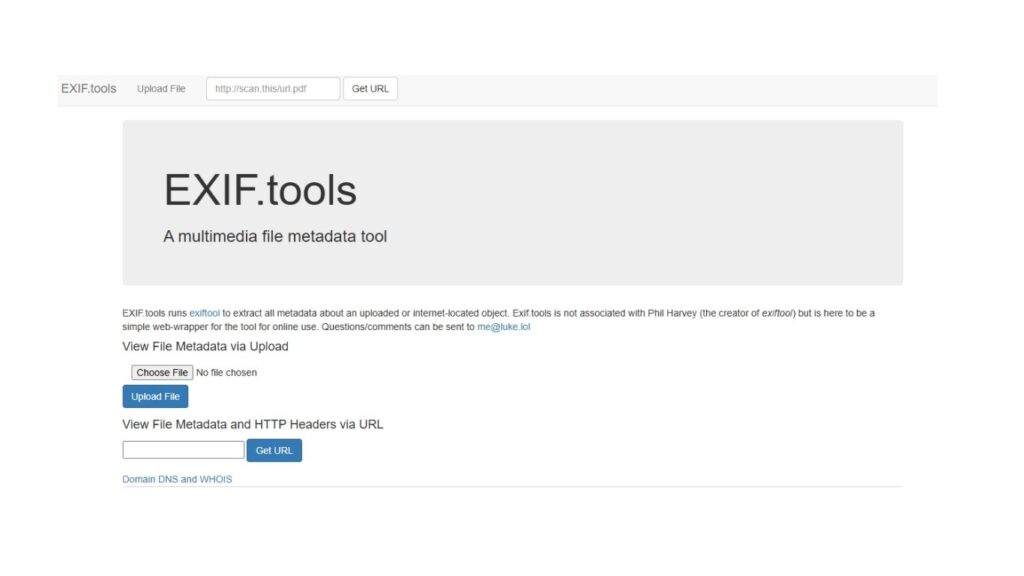
Exif Tool is a free, open-source software developed by Phil Harvey that allows users to view, edit, and manipulate metadata in a wide variety of file types.
Metadata, often stored in formats like EXIF (Exchangeable Image File Format), IPTC (International Press Telecommunications Council), and XMP (Extensible Metadata Platform), contains information about the file beyond the image itself.
For example, a JPEG photo might include:
- Date and time taken
- Camera model and lens type
- Aperture, shutter speed, ISO
- Geolocation (latitude/longitude)
- Copyright and creator information
With Exif Tool, you can read, remove, or modify this metadata as needed.
Read More about Marketing
Why Use Exif Tool?
Here are the main reasons why has become a go-to solution for professionals and hobbyists:
- Versatility: Supports metadata editing across images, audio, video, and document files.
- Cross-Platform: Works on Windows, macOS, and Linux.
- Command-Line Power: Ideal for automation, batch processing, and scripting.
- Wide File Support: Handles formats like JPEG, PNG, TIFF, RAW, MP4, PDF, and more.
- Free & Open Source: No licensing restrictions, making it accessible to everyone.
Metadata Formats Supported by Exif Tool
Exif Tool supports multiple metadata standards, making it one of the most comprehensive tools available.
1. EXIF (Exchangeable Image File Format)
- Found in JPEG, TIFF, and RAW files
- Stores technical details like exposure, camera settings, and timestamps
2. IPTC (International Press Telecommunications Council)
- Common in journalism and media workflows
- Stores captions, keywords, copyright, and author information
3. XMP (Extensible Metadata Platform)
- XML-based format developed by Adobe
- Widely used for digital asset management systems
4. Maker Notes
- Proprietary metadata stored by camera manufacturers
- Includes brand-specific information (e.g., Nikon, Canon, Sony)
5. Other Formats
- GPS data
- ICC profiles
- Audio/video metadata (e.g., MP4, WAV, AVI)
Key Features of Exif Tool
Exif Tool is more than just a metadata viewer—it’s a powerful editing suite with advanced capabilities.
- Read & Write Metadata – Access detailed information and update fields as needed
- Batch Processing – Edit thousands of files at once with simple commands
- Cross-Format Support – Modify metadata across images, videos, audio, and documents
- Geotagging Support – View and edit GPS coordinates
- Customizable Output – Export metadata in text, JSON, or XML formats
- Backup Options – Automatically create file backups before editing
Installing Exif Tool
Exif Tool is a command-line application, but it also comes with GUI front-ends for easier use.
On Windows
- Download from the official Exif Tool website.
- Extract the files.
- Add
exiftool(-k).exeto your system path for easy command-line use.
On macOS
- Install using Homebrew:
brew install exiftool
On Linux
- Use package managers like
aptoryum:sudo apt install libimage-exiftool-perl
Common Exif Tool Commands
Here are some practical examples to help you get started:
1. View Metadata
exiftool image.jpg
2. Edit Metadata
exiftool -Artist="John Doe" image.jpg
3. Remove Metadata
exiftool -all= image.jpg
4. Batch Processing (Multiple Files)
exiftool -Author="Typlist" *.jpg
5. Extract GPS Data
exiftool -gpslatitude -gpslongitude image.jpg
Use Cases of Exif Tool
1. Photography & Creative Workflows
- Adding copyright and author tags
- Removing sensitive GPS data before sharing online
- Managing metadata in Lightroom or Photoshop workflows
2. Digital Forensics & Security
- Investigating digital evidence
- Tracking geotagged photos
- Ensuring metadata integrity in legal cases
3. Media & Publishing
- Standardizing IPTC fields for news agencies
- Embedding keywords for SEO and searchability
4. Software Development & Automation
- Embedding metadata in automated pipelines
- Extracting details for machine learning projects
Advantages of Exif Tool
- Free and Open Source – No hidden costs
- Extensive Format Support – Works with almost every metadata standard
- Batch Editing – Saves time on large projects
- Trusted Globally – Used by professionals in media, security, and photography
Limitations of Exif Tool
- Command-Line Learning Curve – May be intimidating for beginners
- No Native GUI – Requires third-party interfaces for easier use
- Risk of Metadata Loss – Incorrect commands can wipe important data
Alternatives to Exif Tool
While Exif Tool is highly popular, several alternatives exist:
- Exif Pilot – A Windows-based GUI tool for editing metadata
- XnView MP – Image viewer with metadata management features
- Adobe Bridge – Professional asset management with metadata editing
- Darktable – Open-source RAW image processing with metadata support
Best Practices for Metadata Management
- Always Backup – Keep a copy of files before editing metadata
- Remove Sensitive Data – Strip GPS and personal details before posting online
- Use Batch Commands Carefully – Test on small sets before large-scale editing
- Keep Metadata Consistent – Use templates for professional workflows
Final Thoughts
Exif Tool is a must-have for anyone working with digital images, videos, or documents. Its ability to read, edit, and manage metadata makes it invaluable for photographers, developers, and digital forensic experts. While it may have a learning curve due to its command-line interface, its flexibility and power make it worth mastering.
By incorporating Exif Tool into your workflow, you gain control over the hidden data in your media files-ensuring security, consistency, and professionalism.